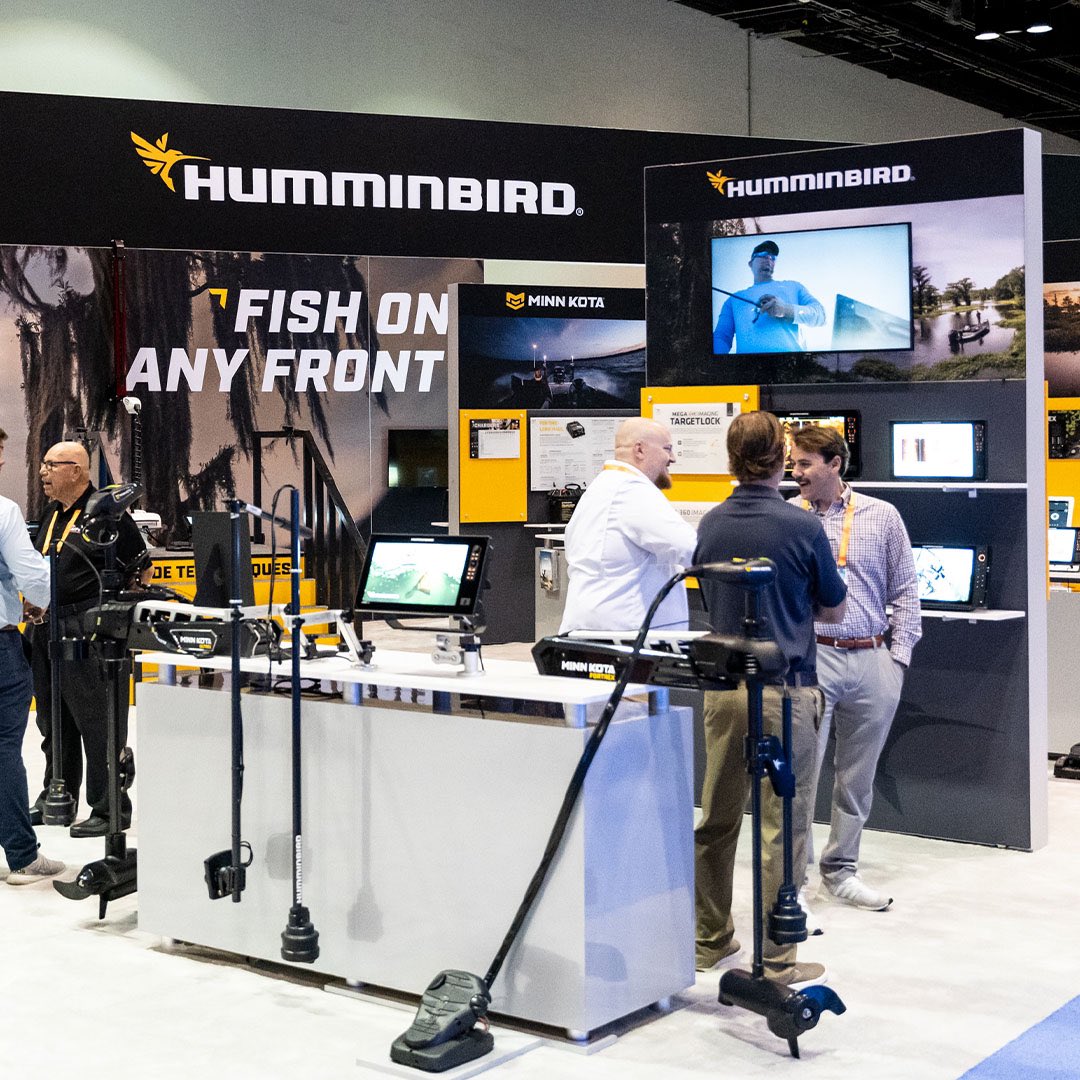
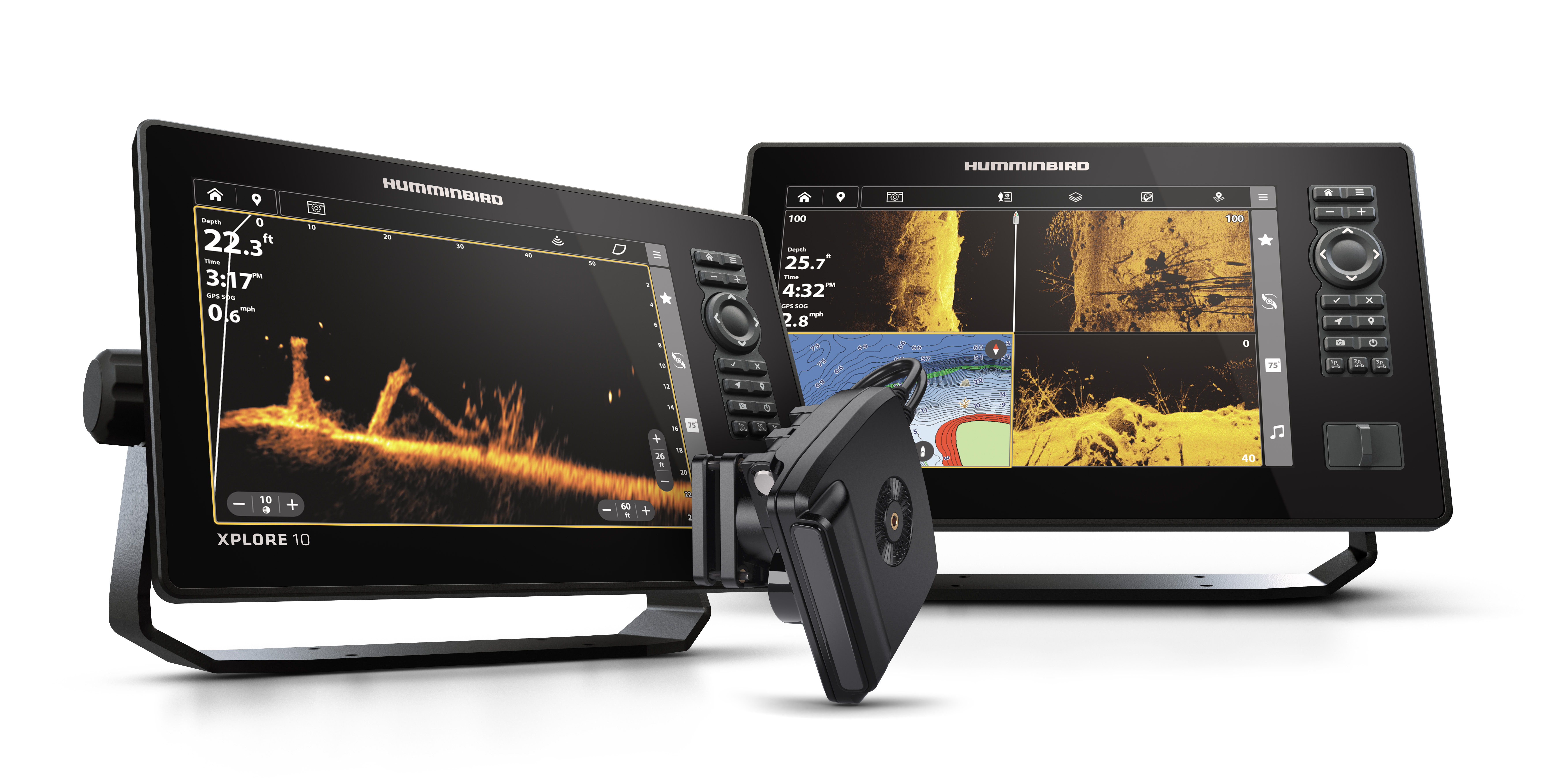
Humminbird’s newest major technologies include the XPLORE fish finder series, MEGA Live 2 forward-facing sonar, improved waypoint management, integrated boat control, and ongoing software updates. Together, these tools help American anglers find fish, study underwater structure, and control compatible boat equipment.
Across the United States, anglers use Humminbird fish finders on lakes, rivers, reservoirs, and coastal waters. New technology is changing how they search for fish. Instead of relying only on a basic sonar reading, anglers can now watch fish move near their boats, follow a lure, view detailed underwater maps, and connect several marine devices.
The biggest recent development is the combination of Humminbird XPLORE and MEGA Live 2. XPLORE brings faster processing, touchscreen and keypad controls, and improved waypoint tools. MEGA Live 2 adds real-time underwater views with better target separation and lure tracking. These systems are designed to work together, although not every older Humminbird display supports them.
There is another important part of the story. Humminbird continues to improve its products through software updates. Updates released in 2026 include improvements to XPLORE and MEGA Live 2. Therefore, new technology does not always mean buying a completely new fish finder. An existing compatible unit may gain useful features through an update.
Source: Bing
What Is the Newest Technology From Humminbird?
The newest major Humminbird technology is its XPLORE fish finder platform, paired with MEGA Live 2 forward-facing sonar. These products focus on faster operation, clearer real-time sonar images, improved navigation, and better control of connected boat equipment.
XPLORE is available in 9-inch, 10-inch, and 12-inch display sizes. It combines traditional sonar and imaging functions with a modern interface. MEGA Live 2 adds another layer by showing fish, bait, and underwater cover as they move around the boat.
The two products serve different roles. XPLORE is the main display and control center. MEGA Live 2 is an optional sonar system that sends live underwater images to a compatible display. An angler can use XPLORE without MEGA Live 2, but the full forward-facing sonar experience requires the additional hardware.
Source: Bing
XPLORE
A modern fish finder with a quad-core processor, Cross Touch controls, customizable shortcuts, mapping, and advanced waypoint tools.
MEGA Live 2
A forward-facing sonar system designed to show fish, bait, structure, and lure movement in real time.
One-Boat Network
A connected system that allows compatible Humminbird displays, Minn Kota trolling motors, and shallow-water anchors to share information and controls.
Software updates
Firmware improvements that can add functions, improve reliability, and refine sonar performance on supported devices.
Why XPLORE Is a Major Development
XPLORE is more than a screen with a new design. Its quad-core processor supports fast operation, while its Cross Touch interface combines touchscreen controls with physical keypad operation. This gives anglers another way to control the display when the boat is moving or conditions make touchscreen use difficult.
The system also supports customizable shortcuts. Rather than moving through several menus, anglers can reach commonly used functions more directly. This can make it easier to change views, adjust settings, and return to important fishing information.
Faster processing
A quad-core processor supports responsive operation and demanding sonar functions.
Flexible controls
Touchscreen and keypad controls provide two ways to operate the display.
MEGA Live 2: The New Forward-Facing Sonar Technology
MEGA Live 2 is one of the most important recent Humminbird sonar developments. It allows anglers to see underwater activity in real time rather than depending only on a traditional scrolling sonar history. This makes it easier to watch a fish approach a lure, follow it, or move away.
The system is useful for bass fishing, crappie fishing, and other techniques where fish position and lure movement matter. For example, an angler fishing around a submerged brush pile can use the live image to look for fish and watch how they respond to a jig.
MEGA Live 2 was introduced as an improved version of the original MEGA Live Imaging system. Its improvements focus on image clarity, target separation, stability, and bait tracking. These changes can help anglers interpret underwater activity, but they do not guarantee that every fish will appear clearly in every condition.
Source: Bing
Improved target separation
Helps distinguish individual fish, bait, and underwater cover instead of showing them as one unclear group.
Better bait tracking
Helps anglers follow a lure and observe how nearby fish react to its movement.
Fifteen color palettes
Provides different display options for anglers who prefer different contrast and visibility settings.
TargetBoost
Enhances selected sonar returns to help suspended fish and bait stand out in open water.
Three MEGA Live 2 Viewing Modes
MEGA Live 2 offers Forward, Down, and Landscape viewing modes. Each mode changes the direction in which the transducer looks. Choosing the correct view is important because a clear image of the wrong area does not help much when searching for fish.
Forward mode looks ahead of the boat. Down mode looks below the transducer. Landscape mode provides a more horizontal view of the surrounding water. The useful range and image quality depend on depth, water conditions, transducer setup, and sonar settings.
Forward mode
Useful for searching ahead of the boat and watching fish approach or follow a lure.
Down mode
Useful for examining fish and structure beneath the transducer.
Landscape mode
Useful for viewing a broader horizontal area around the boat.
How TargetBoost Helps
TargetBoost is designed to make selected fish and bait returns stand out. This can be helpful when fish suspend away from the bottom and an angler needs to keep track of a lure in open water.
It is not a fish-identification guarantee. Sonar displays echoes, not photographs. Experienced anglers still need to interpret the shape, position, movement, and surrounding structure of each return.
Best use
Monitoring suspended fish and bait while presenting a lure in open water.
Main limitation
Water conditions, interference, settings, and target distance can affect what appears on the screen.
Humminbird XPLORE Features Explained
XPLORE combines several fish-finding and navigation tools in one display. Its main advantage is the way these features work together. Anglers can switch between sonar, mapping, and boat-control information without relying on separate devices for every task.
The three display sizes allow buyers to consider their available console or bow space. A 9-inch screen may suit a smaller installation, while a 12-inch screen provides more room for viewing maps and sonar side by side. The right size depends on mounting space, viewing distance, and budget.
The XPLORE family includes different configurations. Some versions are supplied without a built-in transducer, while other models include specific imaging hardware. Buyers should check the exact model number and included accessories before ordering.
Source: Bing
Cross Touch interface
Combines touchscreen operation with physical controls for flexible navigation through menus and views.
Quad-core processing
Supports quick system response and the processing demands of advanced sonar and navigation tools.
Custom shortcuts
Lets anglers make frequently used functions easier to reach.
Advanced waypoint management
Supports color-coded waypoint organization and synchronization of up to 10,000 fishing spots with a compatible smartphone workflow.
What Is Cross Touch Technology?
Cross Touch combines a touchscreen with physical keypad controls. The touchscreen provides direct access to on-screen tools, while the keypad gives the angler another way to move through menus and make selections.
This matters on a fishing boat because conditions can change quickly. Wet hands, glare, vibration, and rough water can make one control method less convenient. Having both options provides more flexibility.
Touchscreen
Useful for selecting map locations, changing views, and adjusting on-screen controls.
Physical keypad
Useful for controlled menu navigation when tapping the screen is inconvenient.
Waypoint Management and Phone Synchronization
A waypoint is a saved location on a digital map. Anglers use waypoints to mark productive fishing areas, submerged structure, boat ramps, hazards, and other useful places.
XPLORE’s waypoint management system supports up to 10,000 fish spots with customizable colors and icons. Compatible synchronization features allow anglers to transfer and manage fishing locations through the One-Boat Network App.
This is useful for anglers who fish several lakes or move between boats. A well-organized waypoint collection can save time and help preserve useful location information. Always verify that the phone, display, software, and app versions support the intended transfer method.
Organize locations
Use different icons and colors to separate brush piles, rock areas, fishing spots, and navigation points.
Transfer fishing information
Use supported app features to manage compatible waypoint data between equipment and a smartphone.
The Latest Humminbird Software Technology in 2026
Software updates are a major part of Humminbird’s newer technology. They can improve existing equipment without requiring an entirely new display. However, the update must match the exact product family and model.
A notable current example is XPLORE software version 7.400. Humminbird’s support information lists this release as an October 2026 update for the XPLORE 9, XPLORE 10, and XPLORE 12 families. It is described as a performance, reliability, and new-feature update.
MEGA Live 2 also received software version 2.270 in October 2026. The listed improvements include better Down Mode performance, improved hard returns, better fish, bait, and jig tracking, and support for using more than one MEGA Live 2 transducer at the same time without the previous interference issue described in the update notes.
These releases show why anglers should check the support page before buying replacement hardware. A software update may address a problem or add a useful capability to equipment they already own.
Source: Bing
XPLORE version 7.400
An October 2026 update for supported XPLORE models, described by Humminbird as a performance, reliability, and new-feature release.
MEGA Live 2 version 2.270
An October 2026 update with improvements to Down Mode, hard returns, and fish, bait, and jig tracking.
Multiple transducers
The MEGA Live 2 version 2.270 notes describe simultaneous use of multiple MEGA Live 2 transducers, with a recommended installation distance of no more than 6 feet between units used together.
How to Check for a Humminbird Software Update
Start by identifying the exact model and current software version. This prevents installing instructions intended for a different product. Check the official Humminbird support website for the matching update and its installation requirements.
For supported XPLORE, APEX, and SOLIX G3 products, Wi-Fi update functions are available after the required software prerequisites have been installed. Humminbird also documents ways to download an update on one connected unit and install it on compatible networked units.
Step 1: Identify the model
Record the full model name and model number from the unit or its documentation.
Step 2: Check the current version
Open the unit’s system information and compare its installed software with the official release information.
Step 3: Read the prerequisites
Check the official instructions for compatible hardware, required earlier updates, and network or storage needs.
Step 4: Install carefully
Follow the model-specific update procedure and maintain stable power during installation.
Step 5: Verify operation
Restart the unit if instructed and check sonar, mapping, networking, and connected accessories.
Why You Should Not Install the Wrong Update
Different Humminbird product families use different software packages. A file intended for XPLORE should not be treated as a universal update for HELIX, SOLIX, or APEX.
Never interrupt an update unless the official instructions tell you to do so. If the display stops responding or an installation fails, consult the product-specific support instructions before attempting another installation.
Check compatibility
Confirm that the update lists your exact model.
Protect power
Use a stable power source during the update process.
One-Boat Network: Connecting Your Fishing Equipment
The One-Boat Network is Humminbird’s connected boating system. It links supported fish finders with compatible Minn Kota trolling motors, shallow-water anchors, and other marine equipment. The goal is to let information from one device help control or guide another.
For example, compatible equipment can use mapping and navigation information to support trolling motor functions. An angler may also be able to control selected accessories from a compatible fish finder instead of moving between separate controls.
This technology is especially useful for anglers who spend long days fishing large reservoirs or moving between several fishing areas. It can reduce the need to switch attention between devices, but its functions depend on the exact display, motor, accessory, network, and software combination.
Source: Bing
Trolling motor integration
Compatible Minn Kota motors can connect with supported Humminbird displays for selected navigation and control functions.
Shallow-water anchors
Supported Talon and Raptor systems can provide wireless control through compatible equipment.
Ethernet networking
Allows compatible displays and accessories to exchange information through a high-speed marine network.
NMEA 2000
Provides access to compatible network information, including selected boat and marine sensor data.
Why Boat Control Integration Matters
Imagine finding a promising ledge on a large reservoir. You mark the location, examine the underwater structure, and then use compatible boat-control tools to help hold or position the boat. This connected workflow can reduce the time spent moving between equipment.
It is not an automatic feature of every Humminbird fish finder. Buyers should check the motor’s networking support, the display’s compatibility list, and any required cables or accessories before planning an integrated installation.
Before buying
Check the complete list of compatible display and motor models.
Before installation
Confirm Ethernet, power, networking, and accessory requirements.
How Humminbird’s New Technology Helps Different Anglers
Not every angler needs the same technology. A tournament bass angler may value forward-facing sonar and rapid waypoint access, while a family fishing from a small boat may get more value from reliable depth readings and simple navigation.
The best setup starts with the type of water and fishing method. It also depends on whether the angler already owns compatible equipment. Buying every available feature can add cost without improving the way someone fishes.
Source: Bing
Bass anglers
MEGA Live 2 can help locate suspended bass, watch lure movement, and examine fish behavior near structure.
Crappie anglers
Live sonar can help locate fish around brush piles and observe how they respond to a jig.
Walleye anglers
Detailed sonar and mapping can support searches around humps, drop-offs, and other underwater features.
Offshore anglers
Compatible mapping, networking, and sonar tools can help interpret deeper water and navigation information.
Casual anglers
A simpler HELIX configuration may provide the depth, mapping, and sonar functions they actually need.
Is Forward-Facing Sonar Worth It?
Forward-facing sonar can be useful when an angler wants to observe fish and bait before presenting a lure. It can also help reveal whether a fish follows, ignores, or approaches a bait.
However, the system is not essential for every fishing style. Anglers who mainly troll, fish shallow cover, or use simple bottom-contact methods may gain more from traditional imaging and detailed maps.
There is also a learning curve. A live sonar screen provides information, but the angler still needs to interpret what appears and make sound fishing decisions.
Worth considering
Anglers who regularly target suspended fish or use techniques where watching lure interaction matters.
Less essential
Anglers who mainly need depth, basic fish detection, and navigation.
XPLORE vs HELIX vs SOLIX vs APEX
XPLORE, HELIX, SOLIX, and APEX serve different needs within the Humminbird range. They should not be treated as interchangeable names for the same fish finder. Their features, control systems, networking options, and compatibility vary by generation and exact model.
XPLORE is a newer platform built around Cross Touch controls, faster processing, and modern connectivity. HELIX remains a practical option for anglers who want established sonar and mapping functions. SOLIX and APEX offer advanced display and networking capabilities in their respective product generations.
A particularly important distinction concerns MEGA Live 2. Humminbird identifies XPLORE, APEX, and SOLIX G3 as compatible display families. Older SOLIX generations and HELIX models should not be assumed to support MEGA Live 2 simply because they support another Humminbird sonar product.
Source: Bing
XPLORE
A newer touchscreen and keypad platform with a quad-core processor, waypoint tools, mapping, and support for MEGA Live 2.
HELIX
A familiar product family with several sonar and mapping configurations. Check the exact model before planning a live sonar upgrade.
SOLIX G3
An advanced display family identified by Humminbird as compatible with MEGA Live 2.
APEX
A premium Humminbird display family with advanced networking and MEGA Live 2 compatibility.
Which Humminbird Should You Choose?
Choose XPLORE if you want the newer interface, processing platform, waypoint features, and compatibility with MEGA Live 2. It is a strong option to investigate when building a new connected fishing system.
Consider HELIX if your main needs are traditional sonar, mapping, and a more straightforward setup. Existing HELIX owners should check whether their current unit already meets their needs before replacing it.
Consider SOLIX G3 or APEX if you want an advanced display system and have a specific reason to choose those product families. The best decision depends on screen size, existing equipment, budget, and the features you will actually use.
For a new modern system
Compare XPLORE models and their included transducer options.
For an existing boat
Check the compatibility of your current display, transducer, motor, and network.
For advanced sonar
Compare XPLORE, APEX, and SOLIX G3 compatibility with the desired MEGA Live 2 configuration.
What to Check Before Buying New Humminbird Technology
The most common buying mistake is choosing a fish finder based only on screen size or advertised sonar features. A complete marine electronics system includes the display, transducer, power supply, mounting hardware, network connections, and compatible accessories.
Start by listing the equipment already installed on your boat. Record the exact model numbers of your fish finder and trolling motor. Then check the official compatibility information for the new product you want to add.
The advertised price of a display may not include every item needed for a complete installation. A forward-facing sonar system, mounting equipment, cables, and other accessories can add to the total cost.
Source: Bing
Display compatibility
Verify that the exact display model and software version support the sonar or accessory you intend to use.
Transducer requirements
Check whether the unit includes a transducer and which sonar technologies it supports.
Network connections
Confirm Ethernet, NMEA 2000, Bluetooth, and power requirements for your planned system.
Mounting space
Measure the console or bow area before selecting a 9-inch, 10-inch, or 12-inch display.
Total installation cost
Include mounting hardware, cables, transducers, and professional installation if required.
Does MEGA Live 2 Work With Older Humminbird Fish Finders?
No, MEGA Live 2 does not work with every older Humminbird display. The manufacturer’s published compatibility information identifies APEX, XPLORE, and SOLIX G3 as supported display families.
Older HELIX and SOLIX models should not be assumed to support MEGA Live 2. Compatibility with original MEGA Live does not automatically establish compatibility with the second-generation product.
If you already own an older display, check its complete model number and the current official compatibility list before purchasing a MEGA Live 2 transducer. This simple check can prevent an expensive mistake.
Supported families
XPLORE, APEX, and SOLIX G3, subject to exact model and software requirements.
Verify before purchase
Do not rely on a product family name alone. Confirm the exact model and required accessories.
Can You Upgrade Without Replacing Your Entire System?
Sometimes. If your existing display supports the feature through a software update or an approved accessory, you may not need to replace the entire setup.
However, software cannot create hardware support that a display does not have. If your unit lacks the required processing, connections, or compatibility, a hardware upgrade may be necessary.
The sensible approach is to identify the specific feature you want first, then check whether your current equipment supports it.
Update first
Check for available official software improvements for your exact model.
Check hardware
Confirm the required display, transducer, and network connections.
Common Mistakes When Using New Humminbird Technology
Advanced electronics work best when they are installed and configured correctly. Even a powerful sonar system can show confusing images if the transducer is poorly positioned or the settings do not suit the water conditions.
One common mistake is treating every bright mark on a sonar screen as a fish. Sonar displays echoes from underwater objects. Rocks, vegetation, bait, fish, and other structures can create returns that require careful interpretation.
Another mistake is expecting the longest possible sonar range to provide the clearest picture. Increasing range can make small targets harder to interpret. A useful range setting should match the water depth and the area being searched.
Source: Bing
Ignoring transducer position
Poor placement can affect sonar readings and create interference or unclear images.
Using unsuitable settings
Sensitivity, contrast, range, and color choices should suit the water and fishing conditions.
Skipping software updates
Outdated software may leave documented improvements unavailable.
Assuming universal compatibility
Different generations and models have different hardware and software requirements.
How to Improve MEGA Live 2 Images
Start with a sensible sonar range and the default or balanced contrast setting. Then make small adjustments while observing the same underwater area. Changing several settings at once makes it harder to understand which adjustment improved the image.
Humminbird’s support guidance describes different Dynamic Contrast options for different conditions. Balanced is the general starting point, High can help in shallow water or when clutter is excessive, and Low can be useful in deeper water when bait tracking is a priority, although it may show more clutter.
If the image remains poor, inspect the transducer installation, check for interference, and confirm that the software is current. Do not assume every unclear return is a hardware fault.
Begin with Balanced
Use it as a starting point for general fishing conditions.
Try High contrast
Consider it in shallow water or when excessive clutter makes the image hard to read.
Try Low contrast
Consider it in deeper water when bait visibility and tracking are important.
What Is the Best Way to Start Using the New Technology?
The best way to start is to learn one feature at a time. Begin with the basic sonar and mapping screens, save a few useful waypoints, and then learn the advanced imaging and networking tools you need.
For MEGA Live 2 users, spend time observing known structure before trying to identify fish in unfamiliar water. This gives you a better sense of how cover, bait, and fish appear on the display.
Keep a simple record of settings that work in different conditions. A setup that works in shallow clear water may not produce the same image in deep or stained water.
Source: Bing
Learn the basic display
Understand sonar, chart, GPS, and system information before moving to advanced functions.
Practice waypoint management
Save and organize useful locations so you can find them again.
Learn one live sonar mode
Start with the mode that best matches your fishing method.
Check system integration
Test connected motors and accessories according to their official setup instructions.
Keep software current
Check official update notices and install compatible releases.
Frequently Asked Questions
Q
What is the newest Humminbird fish finder?
The XPLORE 9, XPLORE 10, and XPLORE 12 are among Humminbird’s newest major fish finder platforms. They offer Cross Touch controls, a quad-core processor, advanced waypoint management, mapping, and compatibility with MEGA Live 2.
Q
What is the latest Humminbird sonar technology?
MEGA Live 2 is a major recent sonar development. It provides Forward, Down, and Landscape views, improved target separation, better bait tracking, and TargetBoost. Its performance depends on the compatible display, transducer installation, and water conditions.
Q
Is Humminbird XPLORE better than HELIX?
XPLORE offers a newer interface, quad-core processing, customizable shortcuts, and advanced waypoint features. HELIX can still be a suitable choice for anglers who need traditional sonar and mapping. The better option depends on the features you need and the cost of upgrading.
Q
Does Humminbird MEGA Live 2 work with HELIX?
Humminbird’s published MEGA Live 2 compatibility information identifies XPLORE, APEX, and SOLIX G3 displays. HELIX models are not listed as compatible with MEGA Live 2. Check the official compatibility information for your exact equipment before buying.
Q
What is the newest Humminbird XPLORE software version?
Humminbird’s support information lists XPLORE software version 7.400, released in October 2026. It is described as a performance, reliability, and new-feature update for supported XPLORE models. Always check the official support page for later releases and model-specific requirements.
Q
Can Humminbird MEGA Live 2 track a fishing lure?
Yes. MEGA Live 2 is designed to improve bait and jig tracking. It can help anglers watch a lure and observe nearby fish responses, although visibility depends on range, water conditions, transducer position, and settings.
Q
Does XPLORE connect to Minn Kota trolling motors?
XPLORE supports integration with compatible Minn Kota equipment through the One-Boat Network. The available controls depend on the specific motor, display, software, and network configuration.
Q
Do I need to buy a new Humminbird fish finder to get better technology?
Not always. Some supported displays receive improvements through software updates. However, new hardware features such as MEGA Live 2 require compatible equipment. Check your current model and its official update and compatibility information before replacing anything.
✦ Wrapping Up
Conclusion
Humminbird’s newest major technologies focus on better underwater imaging, faster fish finder operation, improved navigation, and connected boat control. XPLORE provides the modern display platform, while MEGA Live 2 adds real-time views that help anglers study fish, bait, and lure movement.
The brand’s software updates are also worth watching. The October 2026 XPLORE 7.400 and MEGA Live 2 2.270 releases show that Humminbird continues to refine supported equipment after purchase. These improvements can be useful, but compatibility and hardware limits still matter.
For anglers choosing a new system, the smartest approach is to start with the fishing method and equipment already on the boat. Compare the exact models, check transducer and networking requirements, and consider the full installation cost. The most advanced display is not automatically the best choice if its features do not match the way you fish.
💡 Key Takeaway
Before buying, write down your current Humminbird display and Minn Kota motor model numbers. Check official MEGA Live 2 compatibility, review the latest software releases, and compare XPLORE screen sizes and included transducers. This will help you choose useful technology without paying for features your boat cannot support.
Animal Facts Zone is a family-friendly online resource built for curious minds, students, and wildlife enthusiasts. Founded and edited by Sourov Biswas, the platform breaks down fascinating animal behaviors, species identification guides, and nature trivia into clear, easy-to-read articles.
From backyard butterflies and fireflies to reptiles, birds, and wild matchups, every guide is crafted to answer real questions about the natural world and inspire everyday wildlife appreciation. Whether you are a student researching a species or a nature lover exploring your own backyard, Animal Facts Zone helps you learn something new about the animal kingdom in minutes.